Lovart AI Review 2026: Free Plan, Pricing & App

By Olivia Hart
MyClaw Editorial
MyClaw
Run Best-in-Class AI Agents Now
Run OpenClaw or Hermes Agent on managed MyClaw hosting, so your AI agent stays online, updated, and ready for real work.
AI Takeaway
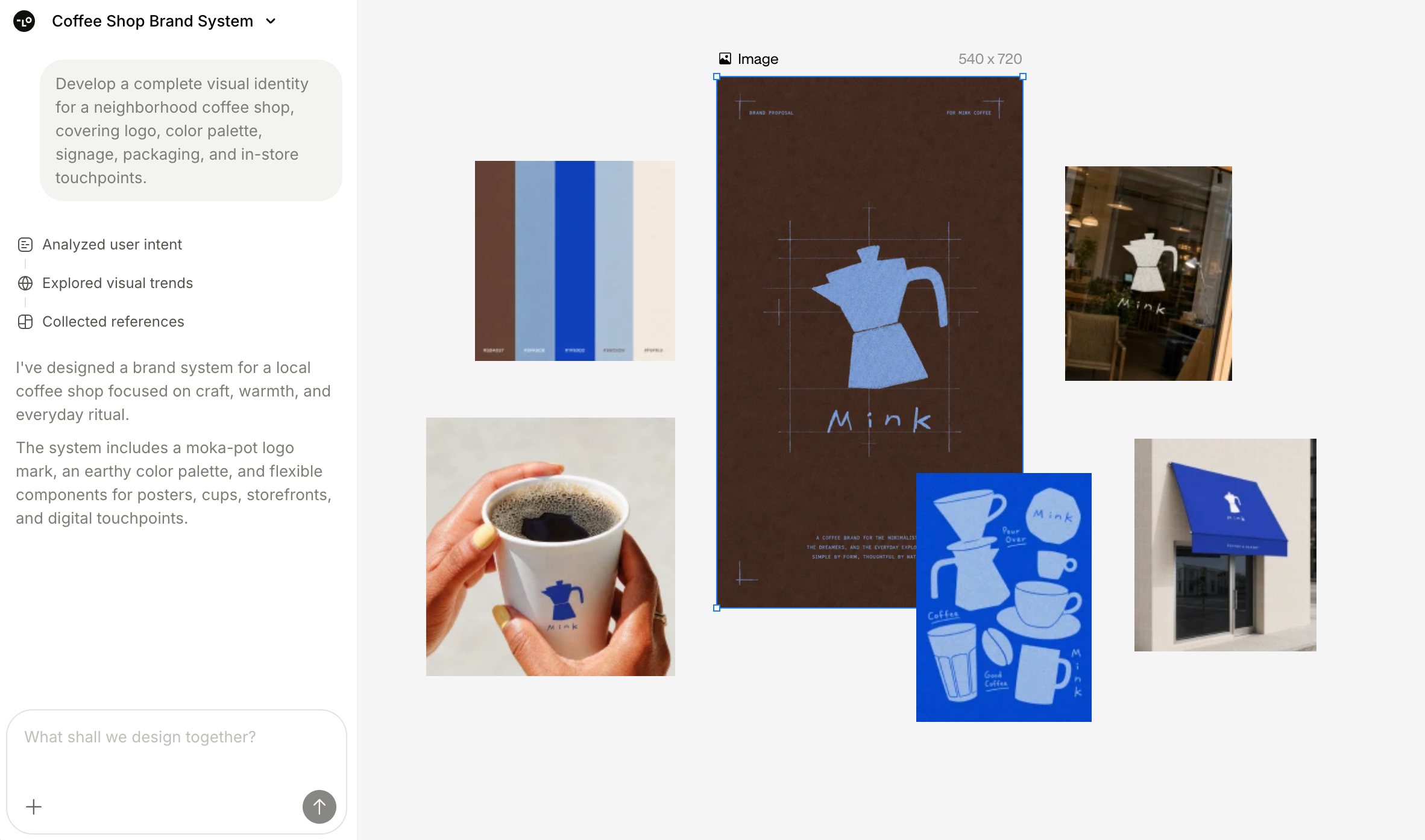
- What is Lovart AI? Lovart is a web-first AI design agent: describe a brief, MCoT routes models, and ChatCanvas holds brand kits, social assets, product visuals, and edits — more like a creative director loop than a one-shot image generator.
- Is Lovart AI free? Yes as freemium: free credits let you test ChatCanvas, but agent jobs burn fast, unused paid credits typically do not roll over, and commercial use often needs a paid plan — confirm the live meter and Terms.
- How does Lovart AI pricing work? Plans are credit-based (commonly Free plus Starter / Basic / Pro / Ultimate-style tiers). Exact dollars and packs fluctuate; treat lovart.ai/pricing and checkout as source of truth.
- Is there a Lovart AI app? The core product is browser ChatCanvas with official mobile web access; native store listings are inconsistent or similarly named — start from lovart.ai and verify any listing before installing.
- When does MyClaw fit instead? Use Lovart for canvas brand packs; use MyClaw’s Image Generator for quick concepts, or a hosted OpenClaw agent for recurring image/file workflows you control — not as a ChatCanvas clone.
Lovart AI at a Glance
| Best for | Non-designers and marketers who want a brief → multi-asset brand pack on one canvas |
| Standout | Design agent + ChatCanvas (MCoT routing, brand kit, Touch Edit), not a single-model image toy |
| Main limits | Credit burn, wait times on heavy jobs, polish often still needed in Figma/Photoshop, billing/trust checks before you pay |
| Access | Web-first ChatCanvas; mobile web supported; native store apps are messy — verify publisher |
| Pricing shape | Freemium credits; paid Starter / Basic / Pro / Ultimate-style + Team; unused cycle credits do not roll over |
| Free? | Yes, limited — good for testing, not heavy commercial volume |
Lovart is a design agent + canvas, not Midjourney-only prompting or a Canva template twin. For one-shot model quality, see GPT Image 2; Lovart’s pitch is orchestration plus assets in one place.
How the Design Agent and ChatCanvas Work
From One Brief to a Brand-Ready Pack
You start with a prompt, brand guide, or short campaign brief. Lovart’s agent (marketed around multi-step “MCoT” reasoning) breaks the job into tasks, routes tools or models, and drops outputs onto ChatCanvas. Official marketing covers logos, social sets, product visuals, decks, and video-oriented models in one loop. Reviews often praise campaign ideation speed more than pixel-perfect final art.
That is a different job from locking a single concept frame first. If you mainly need one sharp subject and aspect ratio before a bigger pack, a focused image skill such as Nano Banana Pro is the narrower lane — Lovart’s value shows when the canvas has to carry the whole set.
Touch Edit, Brand Kit, and Export Reality
ChatCanvas supports local tweaks — text layers, placement, and brand-kit consistency — so non-designers can iterate without bouncing between five tools.
Honest limit: many reviews still finish in Figma or Photoshop. Treat output as draft-to-polish, then handle spacing, legal copy, and print checks in the tool your team already ships from.

Lovart AI Free: What You Actually Get
Lovart is freemium. Free credits let you open ChatCanvas and run real jobs without buying first. Signup and “no card” claims can vary — verify the live meter on your account.
Credits are the constraint: agent or multi-asset briefs burn more than a single image, so free is for testing your brief, not heavy commercial volume. Secondary sources often say commercial rights need a paid plan — read Terms before client work.
If you only need one concept image, a guest can try a single shared AI request in the MyClaw Image Generator (shared across supported text and image requests), then sign in to continue.
Lovart AI Pricing and Credits
Plan Shape and Credit Rules
Official lovart.ai/pricing explains the economy even when dollar cards load dynamically:
- Generations spend credits; agent jobs and richer canvas settings cost more.
- Monthly subscription credits last for the current billing cycle and do not roll over.
- Annual plans still drip credits monthly; unused month credits do not carry forward.
- Top-up packs are available; official FAQ states top-ups are valid for 366 days.
- Subscriptions auto-renew; cancel in account settings to stop the next cycle while keeping access through the current period.
- Fast Generation spends credits for quicker results; Unlimited Relax Generation (plan-gated) queues slower jobs without burning fast credits, with queue priority that differs by tier (Basic / Pro / Ultimate in the FAQ).
Named tiers in product and FAQ language commonly include Free, Starter, Basic, Pro, Ultimate, plus Team for multi-user needs. Exact list prices and credit counts change and often render client-side — do not treat any third-party table as fixed SKUs.
Commonly reported ranges (verify live checkout): 2026 roundups often cite Starter ~$19–$20, Basic ~$32–$40, Pro ~$79–$90, Ultimate ~$160–$170 monthly, with conflicting credit pools and lower annual effective rates. Confirm the live pricing UI before you pay.
Billing and Trust Signals to Check Before You Pay
Reviews repeatedly flag the same checks: credits feel expensive on complex packs; gens can queue; support and billing friction show up as signals, not legal conclusions.
Test free on a real brief, watch the meter, screenshot renew/cancel UI, and use a card you monitor. Prefer annual only after a paid month that still feels worth it.
Lovart AI App and Where It Runs
The primary product is web ChatCanvas at lovart.ai. Official mobile pages push phone/tablet workflows, and concurrency rules emphasize mobile web alongside desktop web. Individual accounts are limited to about 2 desktop Web + 1 mobile Web simultaneous tasks; teams should look at the Team Plan.
Native stores need caution: Google Play’s com.lovart.app has returned 404 / removal reports in 2026 research, and App Store search can surface similarly named poster or photo apps. Prefer the official site, and only install a store build after the publisher matches Lovart — not a lookalike name.
Strengths, Weaknesses, and Who It Is For
Where Lovart Feels Strong
- Fast campaign and brand-kit ideation from one conversational brief
- Non-designer speed: social + product visuals without opening five apps
- Multi-model / multi-asset orchestration on a single canvas
- Touch Edit and brand kit for light, local consistency work
Where Reviews Push Back
- Credit economics that punish exploration and complex agent runs
- Wait times and queue behavior under load or Relax mode
- Polish debt — finals often still need a design tool
- Billing, support, and cancellation trust signals that make cautious buyers pause
Choose Lovart If… / Skip If…
Choose Lovart if you need on-brand packs quickly, you are comfortable spending credits to explore, and a canvas-first design agent matches how you brief creative work.
Skip Lovart if you need pixel-perfect control from the first export, predictable high-volume unit economics, rock-solid billing confidence before any spend, or a code/handoff workflow closer to design systems than marketing canvases — adjacent reading: Claude Design for that different lane, without turning this into an alternatives list.
Run Image and Creative Follow-Through on MyClaw
Lovart is a design-agent canvas. MyClaw is managed hosting for private, always-on OpenClaw/Hermes agents, plus web chat image tools and creative skills — adjacent for quick concepts and recurring file follow-through, not a ChatCanvas clone.
If canvas packs are overkill, start small:
- Generate a concept image first. Use the Image Generator (or an image skill such as Nano Banana Pro) to lock subject, style, and aspect ratio before any canvas session elsewhere. Guests often get one shared AI request across text and image; then sign in to continue.
- Install one creative skill in a hosted agent. Add something task-shaped such as banner design so the agent can produce sized assets into the workspace files you already use.
- Schedule the repeat job. Keep brief and brand notes in the agent workspace for weekly packs, require human review on finals, and expand only after one clean loop — then compare time saved to the live plan that fits.
Bottom Line
Lovart AI is strongest when you want a conversational design agent that lands brand packs on ChatCanvas fast. It weakens when credit burn, wait times, polish debt, or billing confidence dominate.
Free-test first, measure how many credits your brief burns, then pay only after verifying dollars, credit pools, commercial Terms, and cancel UI on the live site.
Keep MyClaw for concept images and always-on agent follow-through — not as a Lovart substitute. Pick the canvas when the pack is the product; pick a hosted agent when the repeat file loop is. Check live MyClaw pricing before you scale either path.
Skip the Setup, Run Best-in-Class AI Agents Now
Launch a managed OpenClaw or Hermes Agent workspace in minutes, with always-on hosting, updates, and support handled by MyClaw.